output <- lm(y_column ~ x_column,data=tablename)
outputT10: Regression
Regression models
Now we will fit our first regression model.
“Standard” regression output
The command to do this is lm() e.g. linear model.
NOTE, THE WEIRD ~ SYMBOL. This means “depends on” and it’s how we tell R what the response variable is. E.g. y depends on x, or y=mx+c.
For example for the NYHouses data, it would be
# response = Price, predictor = Lot size
Model1.lm <- lm(Price ~ Lot,data=HousesNY)
Model1.lm
Call:
lm(formula = Price ~ Lot, data = HousesNY)

Coefficients:
(Intercept)          Lot
   114.0911      -0.5749
So we are saying here that the equation is
Expected_Average_Price = -0.5749*Lot_Size + 114.0911
E.g. the average expected price house with no Lot/Garden is 114.09
Printing out the equation
You can also directly get the code for the model equation by the equatiomatic package
# YOU MIGHT NEED TO INSTALL THIS PACKAGE (SEE THE TUTORIAL)
library(equatiomatic)
extract_eq(Model1.lm,use_coefs=FALSE)
To make it print out directly, put “asis=TRUE” as a code chunk option e.g. this code
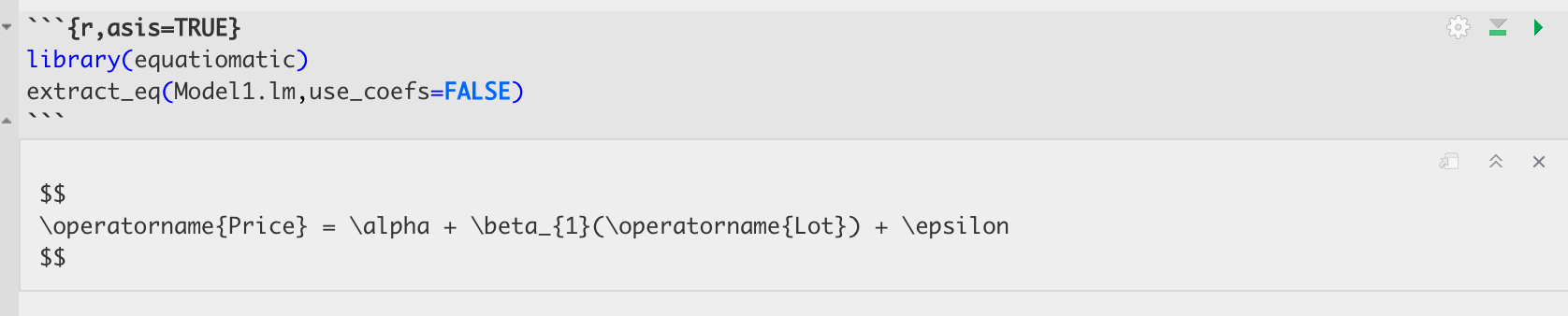
Turns into this:
library(equatiomatic)
extract_eq(Model1.lm,use_coefs=FALSE)
\[ \operatorname{Price} = \alpha + \beta_{1}(\operatorname{Lot}) + \epsilon \]
You can also look at the summary by looking at the summary command:
summary(Model1.lm)
Call:
lm(formula = Price ~ Lot, data = HousesNY)

Residuals:
    Min      1Q  Median      3Q     Max
-74.775 -30.201  -5.941  27.070  83.984

Coefficients:
            Estimate Std. Error t value Pr(>|t|)
(Intercept) 114.0911     8.3639  13.641   <2e-16 ***
Lot          -0.5749     7.6113  -0.076     0.94
---
Signif. codes:  0 '***' 0.001 '**' 0.01 '*' 0.05 '.' 0.1 ' ' 1

Residual standard error: 41.83 on 51 degrees of freedom
Multiple R-squared:  0.0001119, Adjusted R-squared:  -0.01949
F-statistic: 0.005705 on 1 and 51 DF,  p-value: 0.9401
In both cases, we have an estimate of the intercept (0.6386) and of the gradient (-13.8103). We will discuss the other values in later labs/lectures.
Now let’s see how to add the regression line to our scatterplot. We can do this using abline(REGRESSION_VARIABLE), where regression_variable is the name of the variable you saved the output of lm to. For example.
plot(HousesNY$Price ~ HousesNY$Lot)
abline(lm(Price ~ Lot,data=HousesNY),col="blue",lwd=1) 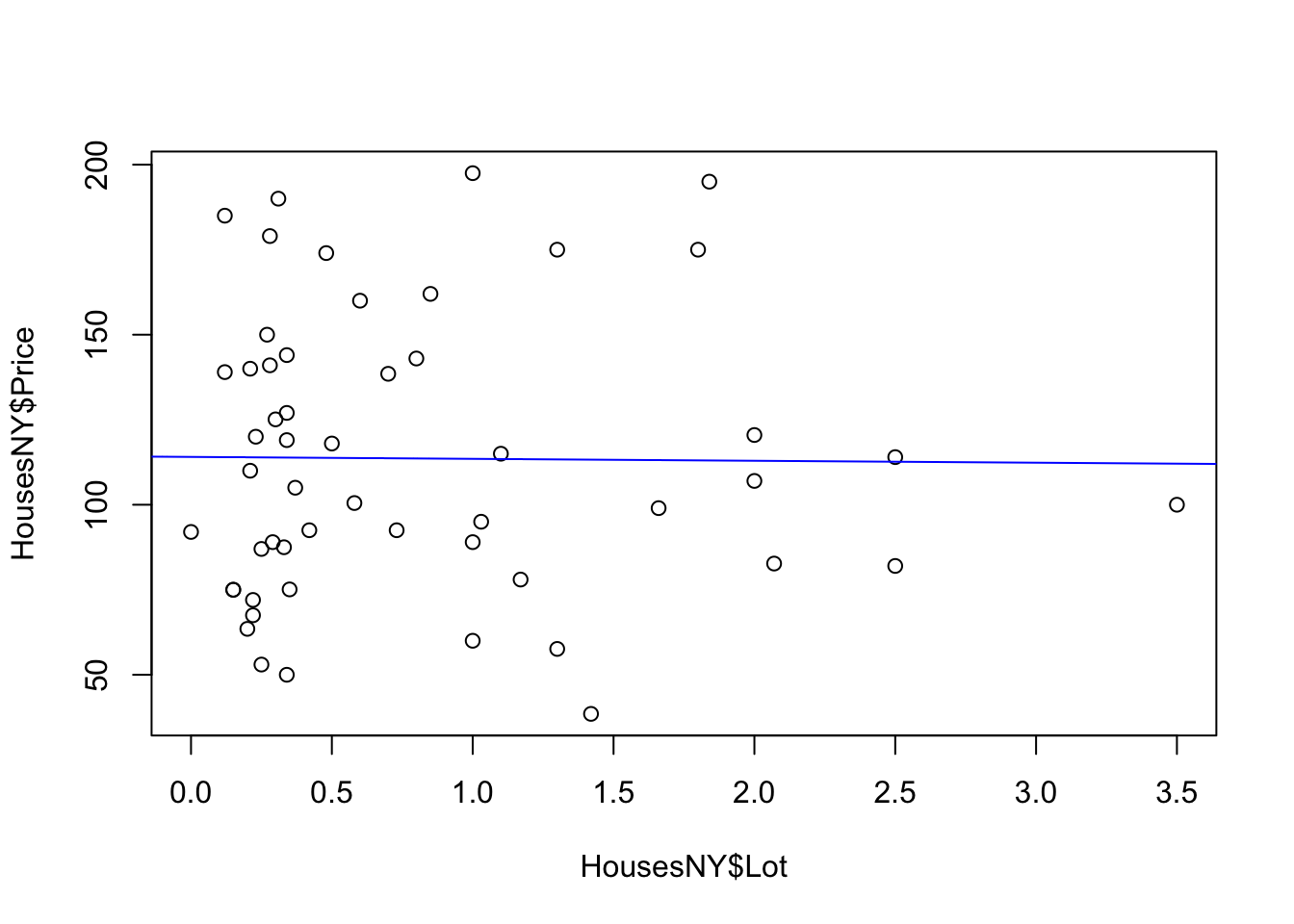
For more professional plots, see the scatterplots tutorial
“Better” OLSRR regression output
If you want a different way of seeing the same output, you can use the ols_regress() command inside the olsrr package.
library(olsrr)
Attaching package: 'olsrr'The following object is masked from 'package:equatiomatic':
hsbThe following object is masked from 'package:datasets':
riversModel1.lm.ols <- ols_regress(Model1.lm)
Model1.lm.ols Model Summary
-----------------------------------------------------------------
R 0.011 RMSE 41.832
R-Squared 0.000 Coef. Var 36.813
Adj. R-Squared -0.019 MSE 1749.910
Pred R-Squared -0.068 MAE 34.152
-----------------------------------------------------------------
RMSE: Root Mean Square Error
MSE: Mean Square Error
MAE: Mean Absolute Error
ANOVA
--------------------------------------------------------------------
Sum of
Squares DF Mean Square F Sig.
--------------------------------------------------------------------
Regression 9.983 1 9.983 0.006 0.9401
Residual 89245.412 51 1749.910
Total 89255.395 52
--------------------------------------------------------------------
Parameter Estimates
-------------------------------------------------------------------------------------------
model Beta Std. Error Std. Beta t Sig lower upper
-------------------------------------------------------------------------------------------
(Intercept) 114.091 8.364 13.641 0.000 97.300 130.882
Lot -0.575 7.611 -0.011 -0.076 0.940 -15.855 14.705
-------------------------------------------------------------------------------------------The ols_regress command produces beautiful output, but sometimes it doesn’t work well with other commands. So I tend to run a lm command at the same time to have both available.
Sometimes, this command can produce a weird error:

This is probably because you loaded the moderndive package. They do not play nicely together. Save your work, restart R and do not run any line that says library(moderndive)!.